
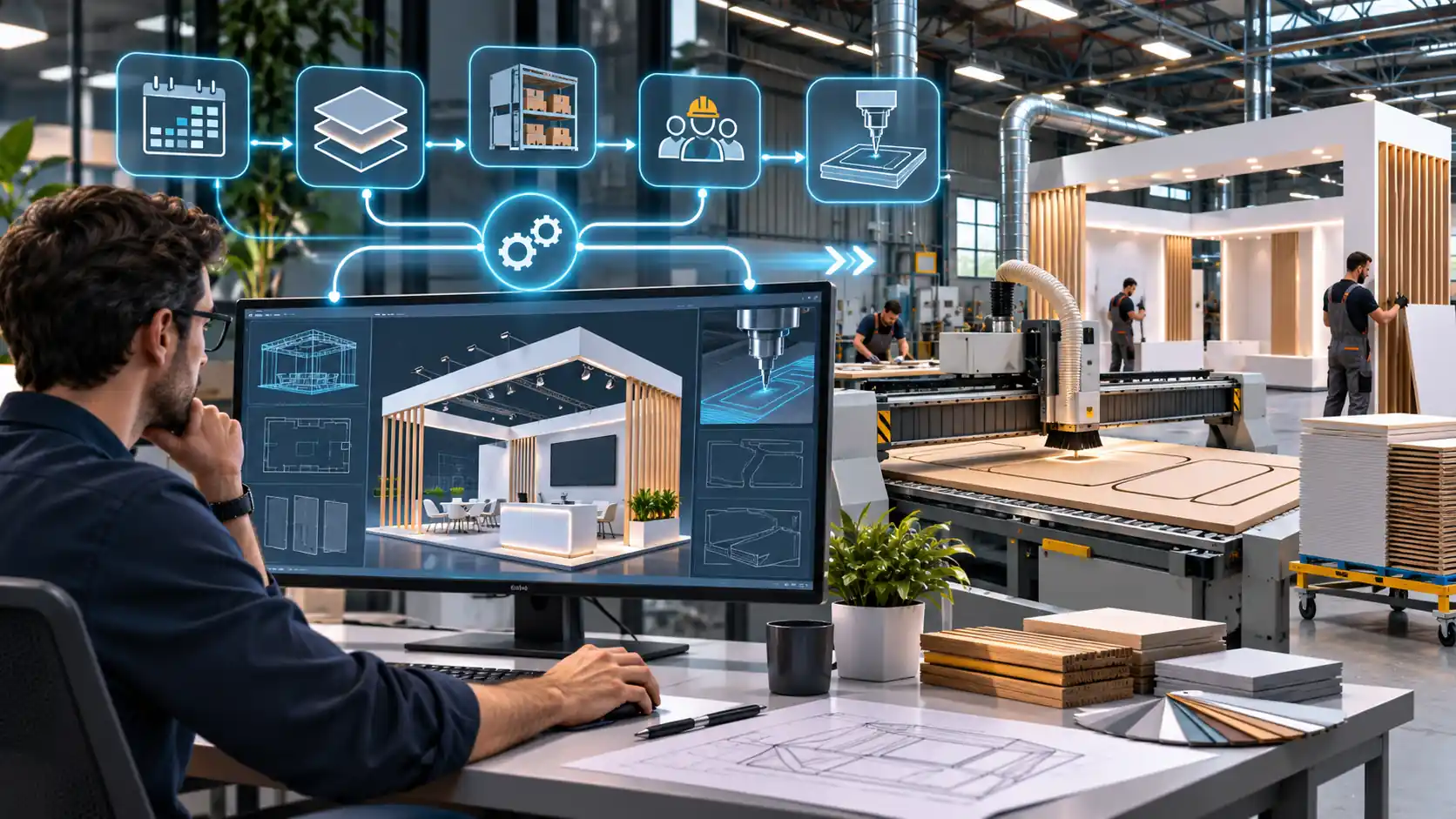
Trade show booth production connects design, engineering, purchasing, machining, graphics, transportation, and installation. When each team works with different information, the risk of errors increases.
Integrating ERP and CAD/CAM into trade show booth production helps connect management, technical documentation, and fabrication through shared data and verifiable procedures.
For agencies, the main benefits include better traceability, stronger version control, greater precision in machined components, and improved visibility into production timelines.
However, having software does not guarantee error-free production. Results depend on data quality, available integrations, and the validations performed throughout the process.
The operating principle is simple: record, design, validate, fabricate, and verify using consistent information.
What ERP, CAD, and CAM are and how they work together in trade show booth fabrication
ERP: enterprise resource planning system that connects information about projects, purchasing, inventory, planning, production, and costs.
CAD: computer-aided design used to create models, drawings, geometries, and technical documentation in two or three dimensions.
CAM: computer-aided manufacturing that uses design information to prepare manufacturing operations for compatible machinery.
CAD/CAM: workflow that connects digital models with manufacturing operations, reducing certain manual transfers between design and machining.
CNC: computer numerical control used to execute machine movements and operations according to programmed instructions.
These systems perform different functions. Integrating them does not mean that every task must be automated or that all information is synchronized without human intervention.
- ERP: manages requirements, materials, orders, resources, and dates.
- CAD: defines dimensions, geometries, connections, and fabrication details.
- CAM: prepares operations and toolpaths for compatible equipment.
- CNC: executes programmed operations under defined machine conditions.
- Quality control: verifies that the result matches the approved documentation.
The relationship between these systems makes it possible to connect a design decision with its production consequences.
For example, changing the width of a panel may affect the CAD component breakdown, material quantities, CAM programming, graphics, and packaging.
Digital traceability: the ability to reconstruct which information was current, who approved a change, and which operations were affected.
Version control: the procedure used to identify and distribute the valid revision of each drawing, model, or technical specification.
BOM or bill of materials: structured list of the components, quantities, and references required to fabricate an assembly or product.
The BOM connects engineering and production. It links the designed booth to the components that must be fabricated, purchased, or allocated from inventory.
A digital model can contain correct geometry and still create problems if its references do not match the manufacturing orders.
For that reason, digital integration is not simply about sharing files: it means keeping identifiers, revisions, and responsibilities consistent.
How ERP and CAD/CAM improve traceability, precision, and production timelines
1. Unify information from the briefing onward.
The project begins with an approved scope: dimensions, location, exhibitor requirements, materials, budget, dates, and special elements.
This information should be linked to a project reference that makes it possible to identify drawings, purchases, components, and work orders.
An ERP system can organize resources and dates. CAD develops the technical documentation. Each system should receive validated information for its specific function.
Master data: reference information that should maintain consistent identification across the processes in which it is used.
Using consistent project and component codes reduces the risk of confusing work from different clients or events.
2. Turn the design into manufacturable documentation.
A rendering communicates what the booth will look like. Engineering defines how it will be built.
CAD can be used to develop floor plans, elevations, sections, connections, furniture, structures, and component breakdowns adapted to workshop processes.
Technical component breakdown: set of individual parts and dimensions required to fabricate or assemble a designed element.
Before the design is released, dimensions, materials, tolerances, connections, and compatibility with the booth space should be checked.
For custom trade show booths, this review is especially important where walls, signage, furniture, and audiovisual installations intersect.
Digital design does not eliminate physical constraints. A component must still be machinable, transportable, manageable, and installable using the available resources.
3. Connect component breakdowns, materials, and purchasing.
The BOM transfers engineering requirements into management. This makes it possible to identify available components, pending orders, and materials that could block production.
Useful material planning should make it possible to answer:
- What components does each assembly require?
- What quantities have been approved?
- What materials are currently in inventory?
- Which purchases are still awaiting confirmation?
- Which components must be fabricated in-house?
- Which elements depend on external suppliers?
- Which components could be reused?
These relationships help identify discrepancies before workshop operations begin.
Inventory data must still be updated correctly. An outdated digital inventory can produce planning errors just as easily as an outdated manual system.
4. Control changes before modifying production.
Change management: procedure that records a modification, evaluates its consequences, and updates the affected documentation before implementation.
Suppose an agency replaces a 43-inch screen with a 55-inch screen after the initial design has already been approved.
The change may affect the support structure, opening dimensions, ventilation, cabling, graphics, and installation sequence.
A controlled process should follow this sequence:
- Record: document what the agency is requesting.
- Analyze: identify the drawings, components, and services affected.
- Assess: determine the impact on materials, cost, and schedule.
- Approve: confirm the solution and who authorizes the change.
- Update: publish the new valid revisions.
- Release: communicate to production which version must be executed.
The goal is to prevent the workshop, graphics team, and purchasing department from following incompatible instructions.
Release to manufacturing: internal authorization to produce components using a sufficiently reviewed and approved technical version.
This validation acts as a barrier against rework. Automation should not send a change directly to a machine while it is still awaiting approval.
5. Connect CAD and CAM with machining.
CAM can use digital models to prepare toolpaths and operations for CNC machinery.
The process must define the material, tooling, workholding, coordinates, operations, and parameters compatible with the equipment.
A typical machining workflow is:
- Select the approved CAD model.
- Check material and geometry.
- Configure CAM tools and operations.
- Generate machining toolpaths.
- Simulate and review possible interferences.
- Prepare machine-compatible instructions.
- Fabricate and inspect the finished component.
Autodesk documentation describes this same process: model, setup, toolpaths, simulation, post-processing, and manufacturing.
A correct CAD file does not guarantee correct machining by itself. Tooling, workholding, parameters, and actual machine conditions must also be verified.
Integration can reduce certain manual data transfers, but final precision depends on the entire process.
6. Improve production timeline forecasting.
Capacity planning: allocation of work according to the availability of people, machines, materials, and committed deadlines.
A management system can connect simultaneous projects, pending purchases, and production workload to support planning decisions.
The advantage is detecting potential bottlenecks earlier, not guaranteeing that any deadline is achievable.
In trade show booth fabrication, production demand may become concentrated during specific weeks when major international trade shows overlap.
Up-to-date information helps determine which jobs should be prioritized, which processes can overlap, and which components need to be brought forward.
Bottleneck: resource or activity whose capacity limits the progress of the overall process.
An available machine does not solve a project if an approval, a critical material, or the installation crew is missing.
7. Record quality controls and recurring errors.
Quality control: set of inspections used to verify that components and assemblies comply with established requirements.
Inspection should begin before installation. Dimensions, finishes, connections, lighting, and machined components can all be checked during production.
When a component is nonconforming, its reference, revision, defect, known cause, and corrective action should be recorded.
Rework: additional activity required to correct or repeat work that does not meet the intended requirements.
This record makes it possible to identify recurring problems and connect them to engineering, purchasing, or manufacturing decisions.
An issue discovered during installation should be able to flow back to the technical team to improve future projects.
8. Measure whether digitalization is actually working.
A company should not claim that its system reduces errors by a specific percentage unless it has comparable data to support that statement.
Results can be evaluated using indicators measured before and after introducing a digital process.
- Rework rate: hours spent on corrections / total production hours × 100.
- First-pass quality: components accepted the first time / components inspected × 100.
- Milestone compliance: milestones completed on time / planned milestones × 100.
- Version errors: incidents caused by incorrect or outdated documentation.
- Approval time: time between a change request and its authorization.
- Installation incidents: problems detected during installation and their causes.
These indicators should use consistent definitions and comparable time periods. Engineering, supplier, transportation, and installation errors should also be distinguished from one another.
A reduction in rework may be related to digitalization, but attributing the entire improvement to it requires analyzing other process changes as well.
9. Support collaboration with B2B agencies.
An agency needs visibility into the status of its project without having to manage every industrial operation directly.
A digitalized partner can organize information related to approvals, revisions, critical purchases, dates, and incidents.
The information shared should be useful and proportional. Providing full access to every internal system used by the manufacturer is not necessary.
A report can give the agency visibility into relevant milestones and the decisions that require its involvement.
10. How Full-Expo applies this production model.
Full-Expo works exclusively with agencies, design studios, and B2B professionals on trade show booth fabrication and installation projects for European trade shows and conferences.
The company presents Full Digital as its digitalized process model and states that it has implemented an integrated ERP-CAD/CAM system.
It also describes the connection between its technical team and automated machinery, together with material and production management processes.
Its approximately 2,000 m² facilities near Fira Barcelona include dedicated areas for carpentry, painting, assembly, and logistics.
For an agency, these capabilities make it possible to manage a project through a common industrial framework, from technical validation through fabrication and installation.
Coordination does not eliminate the need to approve designs, review drawings, inspect components, and verify final handover.
Nor does it make it possible to guarantee a specific reduction in errors or lead times without comparing actual performance data.
The value of digitalization lies in creating better conditions for controlling the process: consistent information, traceable changes, verifiable fabrication, and documented planning.
Ultimately, ERP and CAD/CAM in trade show booth production: benefits for agencies means using technology and shared procedures to reduce discrepancies and support better technical decisions.
The final sequence is the same as at the beginning: record, design, validate, fabricate, and verify. Software connects the stages, while professionals verify that every decision is executed correctly.
Frequently asked questions about ERP and CAD/CAM for trade show booths (FAQs)
Not necessarily. It can receive reports on milestones, approvals, changes, and production status without having full access to the manufacturer’s internal system.
Yes, provided the files can be exchanged and validated correctly. File formats, geometry, units, references, and potential information loss should all be checked.
Work can still be managed through file exchanges and manual controls, but references, revisions, and data consistency must be carefully verified.
The component should be checked against the approved drawing, the discrepancy documented, the cause identified, and the correction validated before other components are modified.
Through access permissions, confidentiality agreements, file management, and security procedures appropriate to the project and the companies involved.
Yes. It can be applied to both custom-made parts and repetitive components, provided their geometry and manufacturing process are compatible with the machinery being used.